
BitTorrent, built in
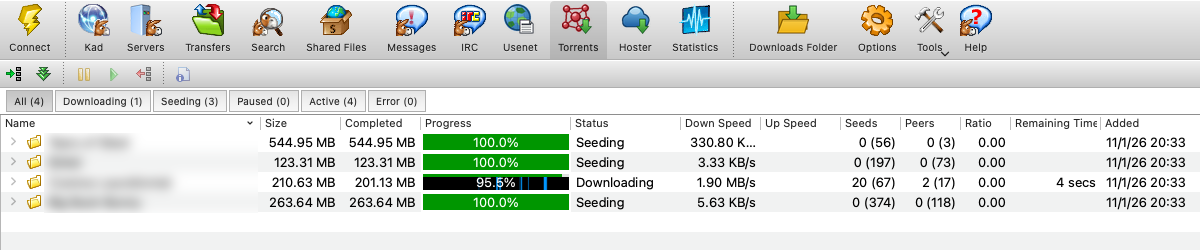
eMule Qt downloads torrents as well as ED2K, Kademlia and Usenet files. Open a .torrent file or a magnet link and it lands in its own Torrents tab, downloads from the swarm and seeds back until the limits you set are reached.
The engine is libtorrent, the same library behind qBittorrent and Deluge, and it runs in the daemon beside the ED2K and Usenet engines — so torrents keep going on a server or NAS with no window open, and the client attaches to them like to everything else.
Getting a torrent in
- Open one or several
.torrentfiles, or add magnet links, from the Torrents tab - Paste Magnet Links (or
Ctrl+V) adds every magnet on the clipboard at once, straight to the default folder - Double-click a
.torrentfile or click a magnet link in the browser, once eMule Qt is registered for them - Download Torrent on a search result — torrents come from Torznab indexers and from the torrent catalogues some eD2K servers keep
emulecored --add-torrent <file|magnet>from a script
The add dialog shows the files inside before anything starts, so you can untick what you do not want and pick the folder.
The Torrents tab
The layout follows Transmission. A filter bar splits the list into All, Downloading, Seeding, Paused, Active and Error, with counts. Below the list, three panes follow the selected torrent:
- Peers — who you are connected to, with the familiar status letters (encrypted, µTP, from DHT or PEX, incoming, choked or unchoked) explained in the tooltip
- Trackers — status, next announce and scrape counts; add, remove or re-announce
- Files — the folder tree with sizes, a Download check box per file and a priority menu
A double click opens the inspector: hashes, origin, magnet and comment; a piece map of what you have and what the swarm has; and per-torrent speed limits, seed ratio, seed time and peer limit.
Finding peers
Trackers, the DHT, peer exchange (PEX) and local peer discovery (LSD) are all on by default and can each be switched off. Connections are encrypted when the peer supports it, and you can require encryption. The listening port is mapped by the same UPnP / NAT-PMP / PCP code eMule Qt uses for its ED2K ports, and your eMule IP filter applies to torrent peers too — one blocklist for every network.
One client, one budget
BitTorrent shares the global download and upload limits with ED2K and Usenet instead of fighting them. You choose the BitTorrent share (25% by default); it is a floor while the other engines are busy, never a cap while they are idle, so an idle engine lends its whole share. Optional hard caps sit on top, and every torrent can have its own limits inside them.
Seeding stops when a torrent reaches the share ratio (1.0 by default) or the seeding time you set, globally or per torrent. A queue keeps three downloads and five seeds active at once unless you change it. Torrents save to their own download folder, or to the ordinary incoming folder if you leave that empty, and the bandwidth graphs in Statistics show BitTorrent traffic beside the rest.
Switch BitTorrent off and nothing downloads, nothing seeds and the port closes; your torrents stay in the list and continue where they stopped when you switch it on again.
 English original
 Español Spanish
 Italiano Italian
 Français French
 简体中文 Chinese (Simplified)
 Deutsch German
 繁體中文 Chinese (Traditional)
 한국어 Korean
 Nederlands Dutch
 Polski Polish
 Русский Russian
 Português Portuguese
 日本語 Japanese