
The ed3k pages of the Options dialog
ed3k is eMule Qt’s own file sharing network, running next to eD2K and Kad. Its settings have their own group in Options, below eD2K and BitTorrent. This guide walks through every page, from top to bottom.
| Page | What it holds |
|---|---|
| ed3k | The node on or off, what is shared, Hiding, eD2K compatibility. |
| Connection | The UDP port, node lists for the first contact, chain endpoints. |
| Credits | Spend earned credits on faster downloads, automatically. |
| Hoster | Downloads from file hosters: Java, accounts, captcha solvers, multi-hosters, Click’n’Load. |
| Names | Readable names for ed3k keys: pins, petnames, name lists. |
| Filters | Lists that mark fake, harmful or spam files, and your own verdicts. |
| Extended | Hash memory, local network, index nodes, room history, which downloads go under the anonymous key. |
ed3k (General)
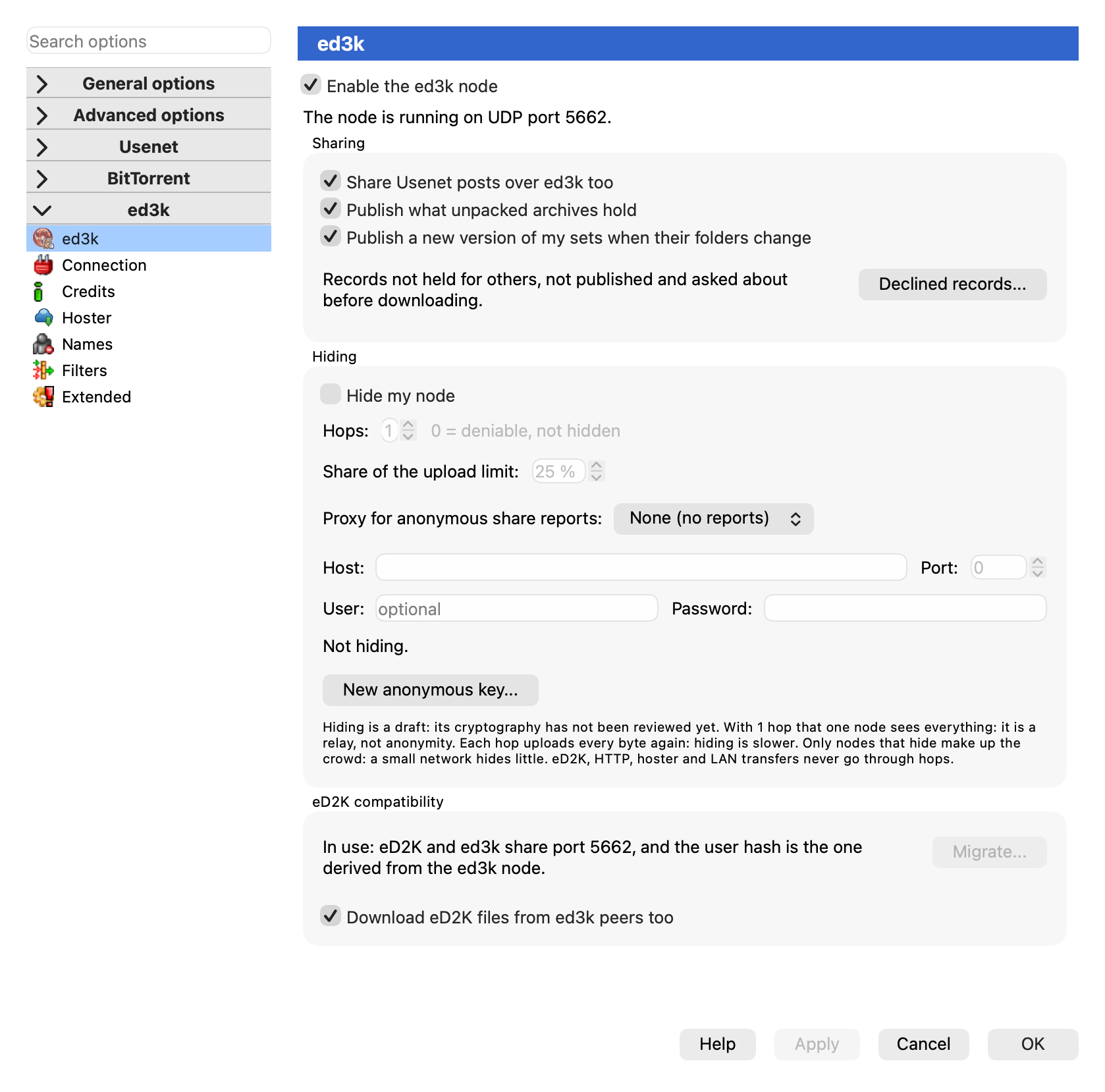
- Enable the ed3k node runs the ed3k node inside the core. It is on by default. The line below it tells you whether the node is running, and on which UDP port. Switched off, ed3k downloads, ed3k searches and downloads from file hosters stop.
Sharing
Everything in your Shared Files list is offered on ed3k as well as on eD2K and Kad. There is no switch for that any more.
- Share Usenet posts over ed3k too. Finished Usenet downloads are shared either way. With this on, their article lists and post records are shared as well, so other eMule Qt users can fetch the same release from Usenet. Off: only the files.
- Publish what unpacked archives hold. On by default. When eMule Qt unpacks an archive (from a hoster, Usenet or a torrent), it lists the files inside on ed3k, so others can see what an archive holds and pick files before they download it. Only the file list is published: no download links, no Usenet message IDs.
- Publish a new version of my sets when their folders change. If you publish an ed3k set (a folder shared as one link, under My ed3k Sets), eMule Qt watches its folder. Add, change or remove a file there, and a new version of the set goes out to its followers.
- Declined records… opens the list of records you decline: file roots, eD2K hashes, publisher keys, kinds of records and keywords, typed in or taken from lists at URLs you trust (fetched again every 24 hours). Your node does not hold matching records for others, does not publish them for your own files, and asks before you download one.
Hiding
Normally every peer you talk to on ed3k sees your IP address, just as on eD2K. Every node that stores a record for you, or answers one of your searches, also sees who you are. Hiding puts one to three other ed3k nodes, called hops, between you and everybody else. A hop only knows the node before it and the node after it. It cannot read what it forwards.
- Hide my node. Off by default. When you turn it on, eMule Qt creates a second identity, the anonymous key. New ed3k searches, new downloads and newly shared files then use that key, and reach other nodes only through paths of hops. Your normal identity, the node key, stays as it is.
- Hops. How many nodes stand between you and the others: 0 to 3. More hops hide you better, but each one adds a delay and uploads every byte once more, so downloads get slower. The default is 1.
- Forwarding for others. While you hide, your node is always a hop for other hiding nodes as well. There is no switch for it. Their traffic covers your own: nobody watching your connection can tell which data is yours. A node that hides without forwarding would give itself away to its first hop.
- Share of the upload limit. How much of your upload limit forwarding for others may use. The default is 25 %.
- 0 hops means nobody stands in between. You still act under the anonymous key, and a peer cannot tell whether you are the owner or just a hop forwarding for someone. That makes you deniable, not hidden. A firewalled node (a leaf, see ed3k Network) shares nothing under the anonymous key at 0 hops. The status line says so.
- Proxy for anonymous share reports. Paid sets ask the people who hold them for a short share report. Under the anonymous key, eMule Qt sends those reports only through the proxy you enter here: never directly, and never through the normal proxy from Options → Proxy. Leave it at None (no reports) unless you use paid sets while hiding.
- New anonymous key… gives you a fresh anonymous identity. Queue places and what uploaders remember about the old one are lost, and running downloads under it start over at their sources.
The status line under the settings shows what is happening right now. For example Hiding as anonymous node …: 2 of 3 paths built, or Waiting for enough hops. eMule Qt needs to know at least 20 nodes that forward before it builds the first path, so in a small network this can take a while.
Which files are hidden?
A file keeps the key it was shared or downloaded under. Turning on Hide my node does not move files you already share. To move one, right-click it in Shared Files or Transfers and pick Move to Anonymous ed3k Key… (or back with Move to Node ed3k Key…). eMule Qt always asks first. The ed3k Key column of Shared Files shows the key of each file.
- A file is never offered under both keys. That would link the two identities.
- When a file moves to the anonymous key, it is first unpublished under the node key. Nodes that saw it before may still remember that your node had it.
- Which downloads from other networks go under the anonymous key while you hide is set on the Extended page, under Kad publishing.
- With hiding off, nothing under the anonymous key is served or downloaded. Those files wait until you turn hiding on again. Nothing falls back to your normal identity.
- It is a draft. Its cryptography has not been reviewed by experts yet. Do not rely on it where being found out would harm you.
- One hop is a relay, not anonymity. That single node sees both ends. Use 2 or 3 hops if you want to hide.
- Hiding is slower. Each hop uploads every byte again, and a path is as fast as its slowest hop.
- A small network hides little. Only nodes that hide make up the crowd you hide in.
- Only ed3k is hidden. eD2K, Kad, BitTorrent, Usenet, HTTP sources, file hoster downloads and LAN transfers never go through hops. Do not share or download the same file there, or its sources show your address next to it.
- Traffic is not padded. Someone who watches your internet connection sees that you take part, and how much flows, though not what.
eD2K compatibility
- Migrate… puts eD2K and ed3k on one port and gives you a user hash that is derived from your ed3k node ID. Other eMule Qt clients then recognize you as an ed3k node from any eD2K source record; classic eMule clients notice nothing. New profiles start this way, and the button is greyed out once it is in use. On an older profile it lists every change and asks first. Beware: the eD2K UDP port moves to your TCP port number (open it as UDP on your router), the core restarts, and with the new user hash the credits you earned at other eD2K clients are lost once.
- Download eD2K files from ed3k peers too. On by default. eMule Qt looks up the ed3k copy of every eD2K download by its eD2K hash and fetches missing parts there too. A source that speaks both is used over ed3k.
Connection
Ports
- UDP port. ed3k needs one UDP port and nothing else. After the migration above it shares the eD2K port number, and you change it under Options → Connection. Forward this port as UDP on your router (Low ID explains how), and the node can become a router: the ed3k version of High ID.
- Test Ports asks emule-qt.org whether that UDP port is reachable from the internet. Apply a changed port first. Open Router opens your router’s web page.
- Website server port. ed3k sets can carry a website. eMule Qt serves it to your browser from this TCP port, on your own computer only. Nothing to forward. The port is part of every site’s address, so changing it loses what sites stored in your browser.
Finding nodes
eMule Qt ships with a list of ed3k nodes and also finds them through eD2K peers that run ed3k, so the first contact normally just works.
- Node lists. Extra
ed3k:nodeslinks, one per line, that are fetched when few nodes answer. - Open Node List File… reads an
.ed3knodfile someone gave you. Open only files from people you trust.
Chaintube
Some ed3k sites keep comments, ratings and their catalogue on a blockchain, and the media itself on ed3k. Enter the chain’s JSON-RPC endpoints here, one URL per line: https, or plain http to a chain node on your own computer. With only one remote endpoint, nothing checks its answers. Two endpoints run by independent providers are better. Leave it empty if you do not use such sites.
Credits
ed3k peers who earn credits by uploading can spend them on priority upload slots at others.
- Autostart highspeed download. Off by default. Once your credit balance reaches the autostart threshold (default 2000 credits), every ed3k download bids for priority upload slots. It stops when about 20 credits are left, so the account is never overdrawn.
- Credit factor. The most a download pays per MiB for a priority slot. Default 5 credits/MiB.
The note at the bottom shows your balance and whether highspeed download is running. Nothing happens while the ed3k node is off.
Hoster
Downloads from file hosters run on top of the ed3k node, so their settings live here. The File Hosters page explains the feature itself. In short:
- General tab: allow hoster downloads (on by default, needs the ed3k node), how many run at once (8 by default, never more than one per hoster and account), whether to show captchas, plain web links, link checks, archive extraction, whether to delete archives after a successful extraction (off by default), and whether finished files are shared on eD2K and Kad.
- Single transfer mode (ed3k only) hides the Hoster window. Hoster downloads joined with ed3k are listed in the Transfers window instead and still use the hoster settings; the others pause until you switch it off.
- The Java runtime box finds or downloads the Java program that runs the hoster plugins, and keeps those plugins up to date.
- Sharing links: Publish hoster links (on by default). A downloaded file is shared either way. With this on, its hoster link is also published on ed3k and handed to other nodes that download the same file. A link is often all that keeps a file at a hoster private, so eMule Qt asks before you switch it on.
- Your premium Accounts go here too. Logins stay on your computer: they are never sent to another node and never logged.
- Captcha solvers tab: paid services that solve image puzzles for you.
- Multi-hosters tab: debrid services such as Real-Debrid or AllDebrid download from many hosters with one premium account. A link of a hoster you have no account for goes through the first multi-hoster in the list that supports it and still has quota left. If it fails, the next one is tried, then the hoster itself. Check shows which hosters an account covers.
- Desktop and Link Grabber: open
.dlcfiles, accept links from web pages (Click’n’Load), watch the clipboard, and collect links before downloading.
Names
On ed3k, people, sets and filter lists are known by keys: long strings of hexadecimal digits. Names make them readable. Changes on this page take effect at once.
- Pinned names. When you accept a name for a key, it is pinned: from then on that name always means that key for you, whatever anyone else claims. Unpin forgets it. Vouch publishes that you stand behind the name, and answers your friends with it.
- Petnames. Your own private labels for keys, like names in a phone book. You decide whether your friends may see them.
- Followed name lists. Lists published by others that map names to keys. When two lists name the same thing, the first one in the list wins; use Move up and Move down to order them. The Refused column counts entries that clashed with your pins.
Filters
Filter lists mark fake, harmful or spam files in ed3k search results. Changes take effect at once, while the node runs.
- Followed filter lists. Follow… takes an
ed3k:setlink of a filter list; it updates itself when its author publishes a new version. Open list file… uses an.ed3kfltfile by hand: it has no author and gets no updates. - Mode of each list: Hide and refuse downloads, Hide, or Mark only.
- Own verdicts overrule every list. Mark a file (by its ed3k root or eD2K hash) or an author (by node ID) as Fake, Harmful, Spam or Good. Your own verdicts have a Mode of their own.
- Publish my list… shares your own verdicts as a filter list. Its link goes to the clipboard; whoever follows it gets your updates, since it is published again on every change. Copy link copies it again later, Stop publishing takes it down.
For eD2K and Kad search results, see the Fake File Detector.
Extended
As on eMule’s own Extended page: eMule Qt runs fine without touching these.
- Block hash RAM. ed3k checks files in 256 KiB blocks and keeps their hashes in memory: about 128 MiB per TiB you share. Above this limit, hashes no upload uses are dropped and read from disk again when a peer asks. Auto uses 2 % of your RAM, at least 64 MiB and at most 512 MiB.
- Keep only hashes in use below free RAM. While free memory is below this share of the total (default 20 %), only hashes in use stay in RAM.
Connection
- Find ed3k nodes in the local network. Off by default. Finds other ed3k nodes on your local network. Restarts the node.
- Auto connect to the ed3k index node an eD2K server names. Off by default. Some eD2K servers also run an ed3k index node, the ed3k version of a server, and name it when you log in. With this off, the node is only noted in the ed3k log.
- This node is reachable: skip NAT tests. Off by default. Only for a node whose UDP port is forwarded, or a computer with a public address. The node then counts as open without reach tests and serves as a router. It helps a very small ed3k network, where no other node is there yet to test you. Restarts the node.
- No speed limits for ed3k peers in the local network. On by default. Transfers with ed3k peers on your local network do not use your internet line, so they do not count against the upload and download limits.
Rooms
- Store recent room posts on disk. On by default. Keeps the recent posts of every room you joined in a file, so they show again after a restart. Without it, only posts that other members still hold come back. Posts of private and closed rooms are stored encrypted.
- Posts kept per room. The newest posts kept per room, in memory and on disk. Default 5000.
Kad publishing
While hiding is on, files of the checked networks are shared on ed3k under the anonymous key, with their sets and links. Unchecked, they stay under the node key. Files you already share keep their key; move them in Shared Files.
- eD2K downloads under the anonymous key and Torrents under the anonymous key. Off by default. This hides nothing from eD2K peers or the torrent swarm: they still see your address next to the file, and others can link that to your anonymous key.
- Usenet downloads under the anonymous key and Hoster downloads under the anonymous key. On by default. Only the Usenet provider or the hoster sees what you downloaded; nothing public lists it. Hoster links are not handed out under the anonymous key.
Something unclear, or a setting missing here? Please send us a report or open an issue on GitHub.
 English original
 Español Spanish
 Italiano Italian
 Français French
 简体中文 Chinese (Simplified)
 Deutsch German
 繁體中文 Chinese (Traditional)
 한국어 Korean
 Nederlands Dutch
 Polski Polish
 Русский Russian
 Português Portuguese
 日本語 Japanese