
File hoster downloads
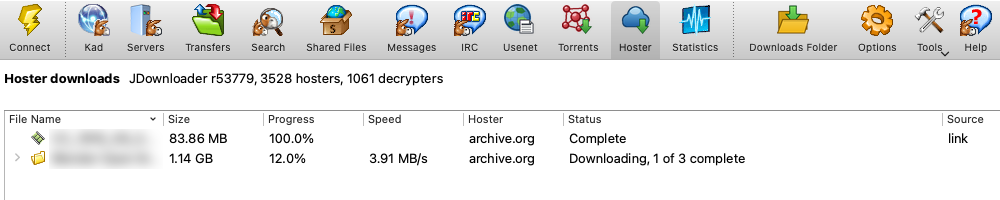
Not every file is on a peer-to-peer network. Many are only on one-click hosters and link sites, and eMule Qt downloads those too: paste the links, and the daemon resolves them, waits out the hoster’s timers, asks you for a captcha when there is one, and moves the finished file to your incoming folder.
The heavy lifting is done by JDownloader‘s plugins — support for more than 3,500 hosters and 1,000 link sites, kept current by the JDownloader project. eMule Qt runs them unmodified in a small helper process next to the daemon, without JDownloader’s interface, so everything happens in the eMule Qt client, the daemon and its logs.
Adding links
- Add links… in the Hoster tab: one link per line, with an optional Package Name that keeps the files under one entry and in one folder
- Paste links takes every link on the clipboard
- A link to a folder asks which of its files you want
- Download on a web search result adds each file with all of its mirrors as a package; the links dialog can check first which mirrors are still online
Mirrors, accounts and resume
When a file has several links, eMule Qt picks the best one first: links you hold a premium account for (with traffic left), then any account, then links checked online, and offline links last. If a link turns out dead, wants a puzzle you skipped, or keeps you waiting more than five minutes, the next mirror takes over. Retry starts again from the first link.
Add your hoster logins under Accounts. eMule Qt checks them, shows whether each is premium and until when, and knows that one login covers all of a hoster’s domains. Passwords stay in the daemon’s configuration, obfuscated, and are never sent to the interface.
A transfer that breaks continues where it stopped when the hoster allows it. Downloads at once limits how many run in parallel (two by default), and never more than one per hoster and account, as most hosters require.
Captchas
When a hoster shows an image puzzle, eMule Qt shows it to you. Skip moves on to the next mirror; Skip hoster skips every puzzle of that hoster until you retry a download there. Puzzles that need a full browser — reCAPTCHA, hCaptcha, Turnstile — cannot be solved yet; such links end as Needs you and the next mirror is tried. While a download is still getting ready, the Status column tells you what the plugin is doing: opening the link, logging in, solving a captcha or connecting.
Checked twice, shared once
Hoster downloads run on eMule Qt’s ed3k node. When a file is already known there, every block from the hoster is verified against it and other ed3k peers can deliver blocks too, so a corrupt or swapped file is caught on the first bad block instead of after the download. When it is not known, the file is hashed once complete.
After a successful download eMule Qt shares the working link with other ed3k nodes, so the next person looking for the file finds a link that is known to work; it checks the link again every few days and withdraws it once it goes offline. Links other nodes share are used when your own link fails, each verified block by block.
Java, handled for you
The plugins need Java 17 or newer. eMule Qt uses one it finds on your system, or downloads Eclipse Temurin from adoptium.net, checks it against its SHA-256 and keeps it in its own folder. Nothing is downloaded or unpacked until hoster downloads are allowed, and switching them off removes the plugins again.
 English original
 Español Spanish
 Italiano Italian
 Français French
 简体中文 Chinese (Simplified)
 Deutsch German
 繁體中文 Chinese (Traditional)
 한국어 Korean
 Nederlands Dutch
 Polski Polish
 Русский Russian
 Português Portuguese
 日本語 Japanese