
Usenet, built in
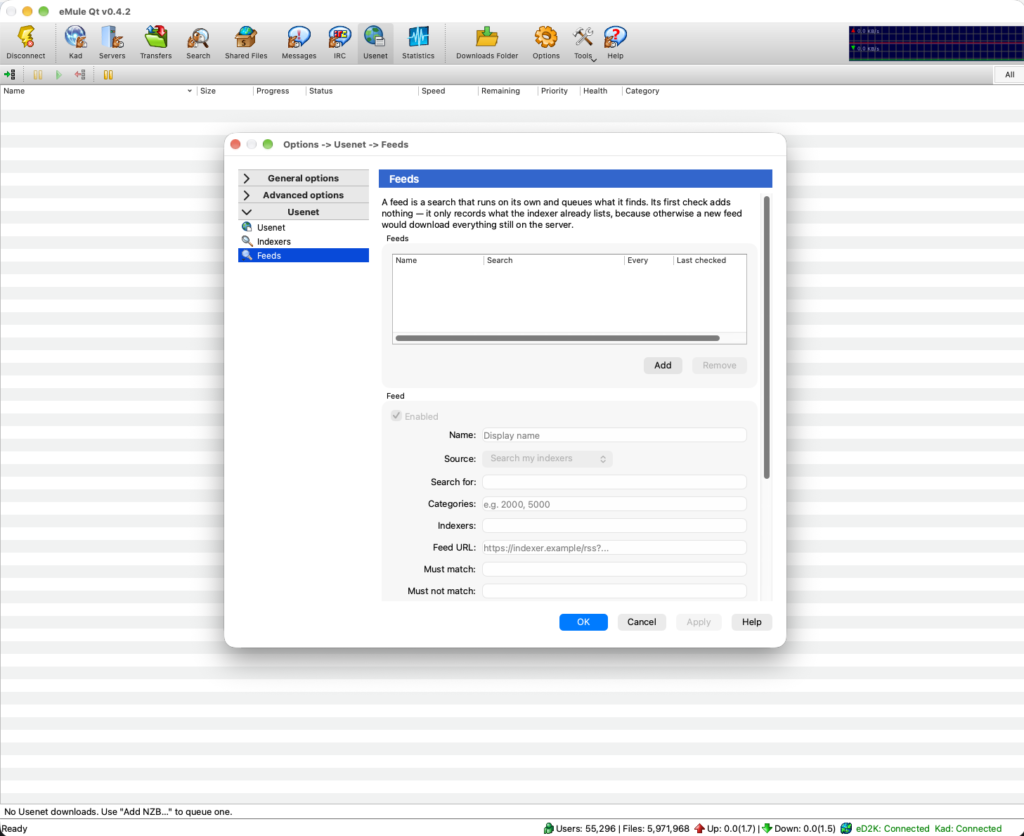
eMule Qt downloads from Usenet as well as from ED2K and Kademlia. Hand it an NZB and it fetches the articles from your news providers, checks them, repairs what is damaged, unpacks the archives and puts the finished files where your downloads go. It will find the NZB for you as well, and keep finding new ones after you have stopped looking.
The engine runs in the daemon, so all of that happens on a server or a NAS with no window open — and the same queue is there in the client, in the built-in web interface and under /api/v1/usenet.
This is downloading only. eMule Qt never posts to Usenet, and it does not pretend to be SABnzbd, so it is not a back end for other software to drive.
Your providers, in the order you want them
Up to 16 accounts, each with its own host, port and encryption — plain, SSL/TLS or STARTTLS — certificate checking, credentials and connection count. The accounts form a ladder:
- Priority levels — the cheap or unlimited account is tried first, and a backup level is reached only once every account above it has actually reported the article missing. A timeout never promotes an article; it is retried where it was.
- Block and fill accounts — mark an account optional and it is spent only on what the others could not deliver.
- Retention — an account that cannot hold an article this old is simply asked later, never treated as proof the article is gone.
- Per-server backoff — a provider that refuses or drops connections is rested for a while instead of being hammered, and the rest of the ladder carries on without it.
Connections are shared out across the worker threads, so the number you enter is the number the provider sees. The whole engine can run through the SOCKS5 or HTTP proxy on the Proxy page, with host names resolved at the far end; if the proxy dies the queue parks and says so, rather than blaming your providers.
An account can be unmetered, metered monthly with the day your billing resets, or a prepaid block. eMule Qt counts what it spends, warns you at 90%, and when an account is used up it parks instead of quietly moving your downloads onto the next account and spending different money. The meter is measured locally, so it reads a few per cent under the figure in your provider’s control panel rather than over it.
Getting an NZB in
- Open one, or several, from the Usenet tab
- Paste up to 20 URLs and let the daemon fetch them —
.nzbor.nzb.gz - Drag and drop onto the window
- Double-click a
.nzbfile, once eMule Qt is registered for them emulecored --add-nzb release.nzbfrom a script- Leave one in a watch folder — it is read once it has stopped changing, then moved aside
- Grab it from an indexer search or a feed
All seven run through the same code, so the same duplicate check catches a release you already have whichever way it arrives — and you can untick the files inside an NZB you do not want before it starts.
Searching your indexers
An NZB has to come from somewhere. Add up to 16 newznab indexers — your own subscriptions, or a local Prowlarr or NZBHydra2 endpoint that fronts several at once. A search fans out across every enabled indexer in parallel, merges the replies and drops the duplicates, and the results arrive in the ordinary Search tab beside your ED2K and Kad results, under the method Usenet (Indexer).
Each result carries enough to judge a release without opening it: title, size, age, category, how many people have grabbed it, which indexer answered, and whether you have already queued, downloaded or cancelled it.
Picking Download To and a category hands the job to the daemon: it fetches the NZB, with its own key, straight into the queue. Your API key never leaves the daemon and the interface never holds an indexer download URL, so a link cannot leak out of a screenshot or a remote session. If a release’s title carries a password, the password travels with it into the queue.
Usenet is deliberately not part of the “Automatic” search method. Every page of results is a paid API call and a query you have disclosed to somebody else, so it happens when you ask for it and not before. For the same reason paging is capped — three pages and a hundred results by default.
Feeds that download for you
A feed is a search that runs on its own and queues what it finds. Up to 32 of them, each either a saved indexer query — your terms, your newznab categories, the indexers you choose — or an RSS URL you paste, which is stored as the credential it usually is.
Everything is filtered before anything is queued:
- Must match and must not match regular expressions, with the rejection winning any tie
- Minimum and maximum size, so a sample or a boxed set does not slip in
- Maximum age
- Its own download category, so a feed’s results land where you want them
Feeds are polled on your interval, with a fifteen-minute floor and one feed checked per minute so nobody’s indexer is hammered, and Check now is there when you do not want to wait. A regular expression that cannot be evaluated stops the feed and tells you why, rather than quietly letting everything through.
The first check is deliberately empty. A new feed records what the indexer already lists and downloads none of it, because otherwise adding a feed would queue everything still on the server. If that is what you want, there is a box for it.
Checked, repaired, unpacked
Articles are decoded with a SIMD yEnc decoder and every part is checked against its own CRC. Files are written sparsely at their real offsets with a per-segment map kept on disk, so a restart re-asks exactly the articles that are missing and nothing else — an interrupted release does not start over.
When everything has landed, PAR2 verifies the set, repairs the damage and restores the real filenames of an obfuscated release. Recovery volumes are not fetched up front: only the smallest set that actually covers the damage is downloaded, and only if there is damage. A release that has provably lost more than its recovery files could ever rebuild can be stopped early instead of spending the rest of your allowance on it, and a release with no PAR2 at all falls back to its SFV.
Archives are then unpacked with libarchive — multi-volume RAR in every naming scheme, ZIP, 7z, the tar family and .001 splits — with per-item passwords for encrypted sets, and setting a password on a release that failed retries it without downloading anything again. Optionally each volume is extracted the moment its last article lands rather than at the end, so a large set finishes unpacking almost as soon as it finishes downloading. A release that fails verification is never published, and a video release that turns out to be carrying a program can be held back instead.
Before spending anything, eMule Qt can ask your providers whether a release is still there. The NZB’s own completeness costs nothing; a sample of one article per file, or a check of every article, costs a little. A release emptier than your threshold is added paused, with the reason on its row — never refused on your behalf, and re-checkable later. Providers disagree about what they hold, so the number is advice, not a verdict.
Watch it before it has finished
A release can be played while it is still downloading — a raw-posted video from the first byte, and a file inside a stored RAR set mapped onto its volumes with real seeking, so jumping to the middle fetches only the articles it lands on. Preview works in the client and in the browser, and the download is briefly prioritised while you are watching. When a preview is not possible, it tells you which of those reasons it is.
One client, one budget
Usenet is not bolted on beside ED2K — it shares with it:
- The same numbered categories, the same tab strip and the same per-category folders on both tabs
- One global download limit, split by a percentage you choose: a floor while both engines are busy, never a cap on one while the other is idle
- One Pause All, from the toolbar, the tray icon, the web interface or the API
- A free-space floor that makes the queue wait, with the reason on the row, instead of failing
- Finished payload offered to your ED2K share like any other download
.nzb file association and what happens after a download. Options → Indexers adds a search indexer, Options → Feeds adds a feed. News-server passwords, API keys and feed URLs are obfuscated in the configuration file rather than held in the system keychain, and the daemon never hands them to the interface.